Guide · Languages
Which languages does ClipPod support?
ClipPod transcribes, picks moments and captions videos in 37 languages, including Hindi, Spanish, Portuguese, French and Arabic. ClipPod fully supports 25 of them, and 12, Hindi and Urdu among them, are in beta. ClipPod puts no watermark over the picture, and its free plan gives enough usage for 5 clips from 1 video a month, with no card.
ClipPod supports 37 languages: 25 with full support and 12 in beta.
Full support (25): English, Spanish, Portuguese, French, German, Italian, Dutch, Polish, Russian, Ukrainian, Romanian, Czech, Slovak, Hungarian, Bulgarian, Croatian, Slovenian, Greek, Swedish, Danish, Finnish, Estonian, Latvian, Lithuanian and Maltese.
In beta (12): Hindi, Urdu, Arabic, Indonesian, Tagalog, Turkish, Vietnamese, Korean, Japanese, Chinese, Hebrew and Persian.
You don’t pick the language. ClipPod detects it on its own and captions in that language, without translating.
Paste a video link freeClipPod’s languages at a glance
| Question | Answer |
|---|---|
| How many languages | 37: 25 with full support, 12 in beta |
| Hindi | Yes, in beta, captions in Devanagari; expect to fix a few words in most clips |
| Urdu | Yes, in beta: good transcripts, a few more mistakes |
| Bengali, Tamil, Telugu, Marathi, Gujarati, Kannada, Malayalam, Punjabi | Not yet |
| Swahili, Hausa, Yoruba, Amharic | Not yet |
| Spanish, Brazilian Portuguese and French | Yes, full support |
| Arabic | Yes, in beta: expect to fix a few words |
| Choosing the language | Automatic: you don’t set it |
| Translation | None: captions stay in the language spoken |
| Import price | By length and language: English is the cheapest, European languages a bit more, other languages more |
| Watermark | None over the picture, in every language |
| A language ClipPod doesn’t support | The import stops, and what it used comes back in full |
Does ClipPod support Hindi and other Indian languages?
Yes. ClipPod supports Hindi and Urdu in beta, and English with full support. Urdu’s transcripts are good, with a few more mistakes than English; Hindi’s can miss words or whole sentences, so expect to fix a few words in most Hindi clips.
ClipPod writes Hindi captions in Devanagari. It does not translate them or write them in Latin letters. A Hinglish video is transcribed in the one language ClipPod hears most, Hindi or English. More on Hindi captions is in how to turn Hindi videos into Shorts.
ClipPod does not support Bengali, Tamil, Telugu, Marathi, Gujarati, Kannada, Malayalam or Punjabi yet.
Where are ClipPod’s languages spoken?
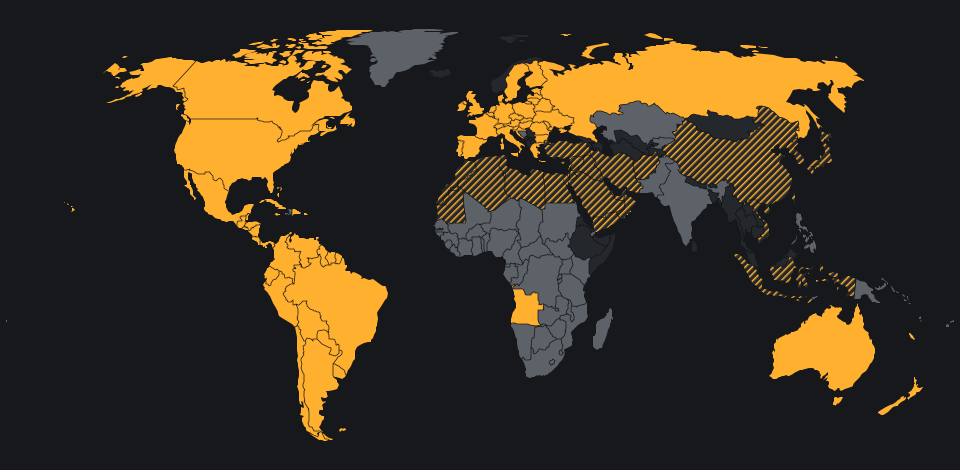
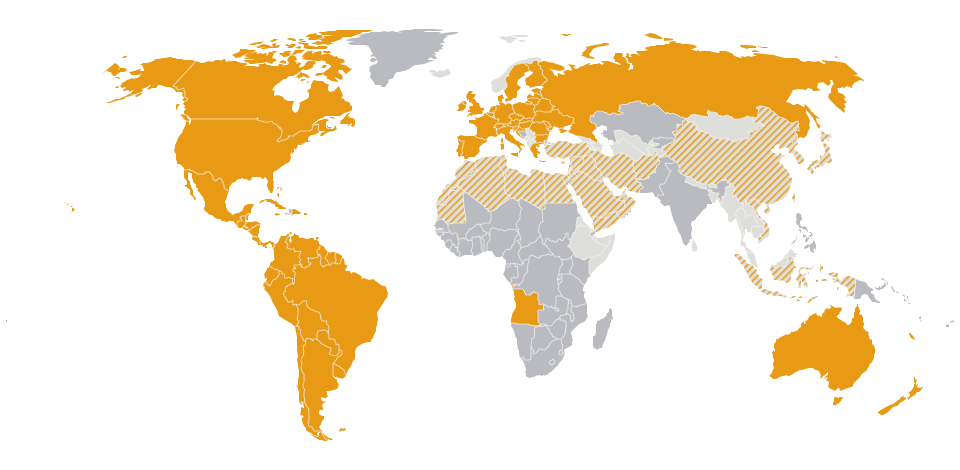
Which languages does ClipPod fully support?
ClipPod fully supports 25 languages, with its most accurate transcripts and captions.
| Language | Native name | Spoken in, for example |
|---|---|---|
| Englishen | English | United States, United Kingdom, Canada, Australia, Ireland, New Zealand |
| Spanishes | Español | Spain, Mexico, Argentina, Colombia, Chile, Peru and all of Latin America |
| Portuguesept | Português | Brazil, Portugal, Angola, Mozambique |
| Frenchfr | Français | France, Belgium, Switzerland, Canada, West and Central Africa |
| Germande | Deutsch | Germany, Austria, Switzerland |
| Italianit | Italiano | Italy, Switzerland |
| Dutchnl | Nederlands | Netherlands, Belgium, Suriname |
| Polishpl | Polski | Poland |
| Russianru | Русский | Russia, Belarus, Kazakhstan, Kyrgyzstan |
| Ukrainianuk | Українська | Ukraine |
| Romanianro | Română | Romania, Moldova |
| Czechcs | Čeština | Czechia |
| Slovaksk | Slovenčina | Slovakia |
| Hungarianhu | Magyar | Hungary |
| Bulgarianbg | Български | Bulgaria |
| Croatianhr | Hrvatski | Croatia, Bosnia and Herzegovina |
| Sloveniansl | Slovenščina | Slovenia |
| Greekel | Ελληνικά | Greece, Cyprus |
| Swedishsv | Svenska | Sweden, Finland |
| Danishda | Dansk | Denmark, Greenland |
| Finnishfi | Suomi | Finland |
| Estonianet | Eesti | Estonia |
| Latvianlv | Latviešu | Latvia |
| Lithuanianlt | Lietuvių | Lithuania |
| Maltesemt | Malti | Malta |
English is transcribed word for word, ums included. The other fully supported languages come out clean: the words as spoken, without filler sounds.
Which languages are in beta on ClipPod?
ClipPod supports 12 more languages in beta. What to expect from each beta language before you import:
- The 25 above, with ClipPod’s most accurate transcripts and captions.
- Good: transcripts with a few more mistakes than the 25. Check names and numbers before you post.
- Expect fixes: usable, but transcripts can miss words or whole sentences; expect to fix a few words in most clips.
| Language | Native name | Spoken in, for example |
|---|---|---|
| KoreankoGood | 한국어 | South Korea |
| TurkishtrGood | Türkçe | Turkey, Cyprus |
| VietnameseviGood | Tiếng Việt | Vietnam |
| TagalogtlGood | Tagalog | Philippines |
| UrduurGood | اردو | Pakistan, India |
| HebrewheGood | עברית | Israel |
| HindihiExpect fixes | हिन्दी | India |
| ChinesezhExpect fixes | 中文 | China, Taiwan, Singapore |
| JapanesejaExpect fixes | 日本語 | Japan |
| ArabicarExpect fixes | العربية | Egypt, Saudi Arabia, Morocco, Iraq and the rest of the Arab world |
| IndonesianidExpect fixes | Bahasa Indonesia | Indonesia |
| PersianfaExpect fixes | فارسی | Iran, Afghanistan, Tajikistan |
Captions stay in the language that was spoken, as for the 25. Importing a video in a beta language uses more of your usage than English or a European language.
How does ClipPod pick the language?
ClipPod works out which language a video is in on its own, before any moments are found. You don’t set anything.
Captions stay in the language that was spoken. A Spanish video gets Spanish captions; nothing is translated to English. The moments are picked in that language too, so a French video’s clips are chosen for what was said in French.
If ClipPod picked the wrong language, “Wrong language?” in the episode menu transcribes the episode again in the language you choose, once per episode, at no new charge. For a video ClipPod heard as Urdu, it offers Hindi first.
What happens if ClipPod doesn’t support your language?
The import stops before any moments are found, and the episode page says the language isn’t supported. What the import used is given back in full.
A language close to a supported one can instead be heard as that language and transcribed wrongly, for example Punjabi or Marathi as Hindi. Read the transcript before you make clips from it.
Languages ClipPod doesn’t support yet include:
- Bengali
- Tamil
- Telugu
- Marathi
- Gujarati
- Kannada
- Malayalam
- Punjabi
- Swahili
- Hausa
- Yoruba
- Amharic
- Thai
- Norwegian
- Serbian
Supported languages FAQ
- How many languages does ClipPod support?
- 37: 25 with full support and 12 in beta. The tables on this page list each one.
- Does ClipPod support Hindi?
- Yes, in beta: transcripts can miss words or whole sentences. ClipPod writes Hindi captions in Devanagari and does not translate them.
- Does ClipPod support Tamil, Telugu, Bengali or Marathi?
- Not yet. ClipPod does not transcribe Bengali, Tamil, Telugu, Marathi, Gujarati, Kannada, Malayalam or Punjabi.
- Does ClipPod work for Spanish podcasts?
- Yes. ClipPod fully supports Spanish, from Spain and all of Latin America. Videos are transcribed, clipped and captioned in Spanish.
- Does ClipPod support Brazilian Portuguese?
- Yes. ClipPod fully supports Portuguese, so a video from Brazil is transcribed, clipped and captioned in Portuguese.
- Can ClipPod translate my clips into English?
- No. Captions are always in the language that was spoken. ClipPod doesn’t translate.
- Do I have to tell ClipPod which language my video is in?
- No. ClipPod works out the language on its own, before any moments are found.
- What if my video mixes two languages?
- The whole video is transcribed in its main language. Short stretches in a second language may come out wrong, so for a show that switches back and forth, check those clips before you post them.
- Does ClipPod handle accents?
- Yes, for regional and non-native accents in any fully supported language. Very heavily accented English is occasionally not recognised as English; if that happens, the import stops and is treated like an unsupported language.
- Do non-English videos cost more?
- Importing one can. Importing a video uses a share of your monthly usage sized by its length and its language: English is the cheapest to import, European languages use a bit more, and other languages more. Making clips uses the same share whatever was spoken. Each step’s share is on the pricing page.
- Is ClipPod free in every language?
- Yes. ClipPod’s free plan works in every language ClipPod supports, with no card. It gives enough usage for 5 clips from 1 video a month in English; 4 clips from 1 video in a European language, and 2 clips from 1 video in other languages.
- What happens if my language isn’t supported?
- The import stops before any moments are found, and what it used is given back in full.
- Why are the captions in my language missing the ums?
- English is transcribed word for word, filler sounds included. The other fully supported languages are transcribed clean: every word as spoken, without the hesitations, which also reads better as a caption.
Clip your video in your language
- Paste a YouTube link or upload a file
- ClipPod finds the moments, frames them vertically and captions them in the language you speak
- No watermark over the picture in any language
- Free: enough usage for 5 clips from 1 video a month, no card
Paid plans from $4.99 a month (Lite). Subscribers can top up from $5.99, and a top-up never expires. See pricing. A month of usage, and you see what each step uses before you confirm.
- The two-letter language codes (checked 29 October 2026): ISO 639 language codes, Library of Congress.
- Which countries speak which: Wikipedia, "List of official languages by country and territory".
- ClipPod plans, your monthly usage and what comes back when something fails: clippod.app/pricing.