Guide · Tools
The 9 best podcast clip makers in 2026, compared by what a podcaster actually needs
Every AI podcast clip maker says it turns long video into viral shorts. The real question is whether you can paste last week's episode and get back the moments you would have picked. And it has to hold up with both hosts in the frame, at a price that survives a weekly schedule. We compared nine tools on exactly that. Short version: ClipPod is the best podcast clip maker for two-host shows, OpusClip is the best all-rounder for solo shows with many sources, and Vizard has the simplest all-in price, with nothing charged per clip.
The short answer. A podcast clip maker takes a long episode, finds the moments worth posting, reframes them to vertical 9:16 for Shorts, Reels and TikTok, and captions them. ClipPod is the best one for two-host and guest shows, because it picks one of six layouts for each camera shot: when two people share the shot and both faces read, the person talking takes the top pane and the captions sit on the seam between them. Every price below was re-checked on the vendor's own pages on 9 October 2026.
Run one episode through ClipPod on the free plan, no card needed, and judge the framing yourself.
What is the best podcast clip maker?
ClipPod is the best podcast clip maker for a show with two hosts or a regular guest, because when two people share the shot and both faces read, the frame splits on its own and the person talking takes the top. OpusClip is the best all-rounder for solo shows and mixed footage, on the widest input list in the category. Vizard is the simplest all-in price, with nothing charged per clip, Klap suits a fixed clip count, and Riverside suits shows recorded in Riverside.
| Tool | Best for | Two hosts talking | Paste a YouTube link | From |
|---|---|---|---|---|
| ClipPod | Two-host and guest podcasts; first clips in about 12 minutes | Automatic split, talker on top | Yes | $9/mo |
| OpusClip | Solo shows with many sources | Automatic split | Yes | $15/mo |
| Vizard | Volume on a budget | Keeps the active speaker in frame; no split | Yes | $29/mo |
| Klap | A fixed clip count per month | Automatic split | Yes | $29/mo |
| Quso.ai | Publishing to many platforms | Speaker layouts, paid plans | Yes | $29/mo |
| Submagic | Caption editing | Not stated | Yes | $19/mo |
| Descript | Editing the whole episode | Multicam, multi-track only | Upload | Editor plans |
| Riverside | Recording and clipping in one place | Smart layouts in the editor | No; records in-app or takes an upload | Paid plans, 14-day trial |
| Munch | Social scheduling first | Not stated | Not stated | $58/mo |
Prices are the monthly-billing entry plan on each vendor's pricing page, re-checked 9 October 2026. "Not stated" means the vendor's own site does not claim the feature; it may still exist.
How do you compare podcast clip makers?
You compare them on five things, in this order: link import, moment selection, what happens when two people talk, caption quality, and cost per episode. We checked every claim below against each vendor's own site, pricing page and help centre on 7 September 2026, and against recent Trustpilot reviews where a quote is used, and re-checked prices, inputs and two-speaker layouts on 9 October 2026.
We have not run a controlled test of every tool on the same episode, so where a tool does not describe a feature the table says "not stated" rather than guessing. ClipPod is our product, so its section describes how it works and where it falls short rather than scoring it. More about who we are.
- Can I paste a link? The episode is already on YouTube. Re-uploading a 4 GB file to get clips out of it is the first thing people give up on.
- Does it pick the moments I would have picked? The most common complaint about every AI clip generator is the same: it clipped the intro and missed the story.
- What happens when two people are talking? A landscape two-shot cannot become a phone-sized clip without losing someone unless the tool stacks them. Several now do; check what triggers the split and who goes on top. See how a split-screen podcast clip works.
- Are the captions usable without a pass? Word-level timing, a style that fits the show, and a placement that does not cover a face.
- What does one episode cost, and what does the free tier stamp on the clip? Almost every tool meters the minutes of the episode you upload. The full arithmetic is in what one episode costs on each tool.
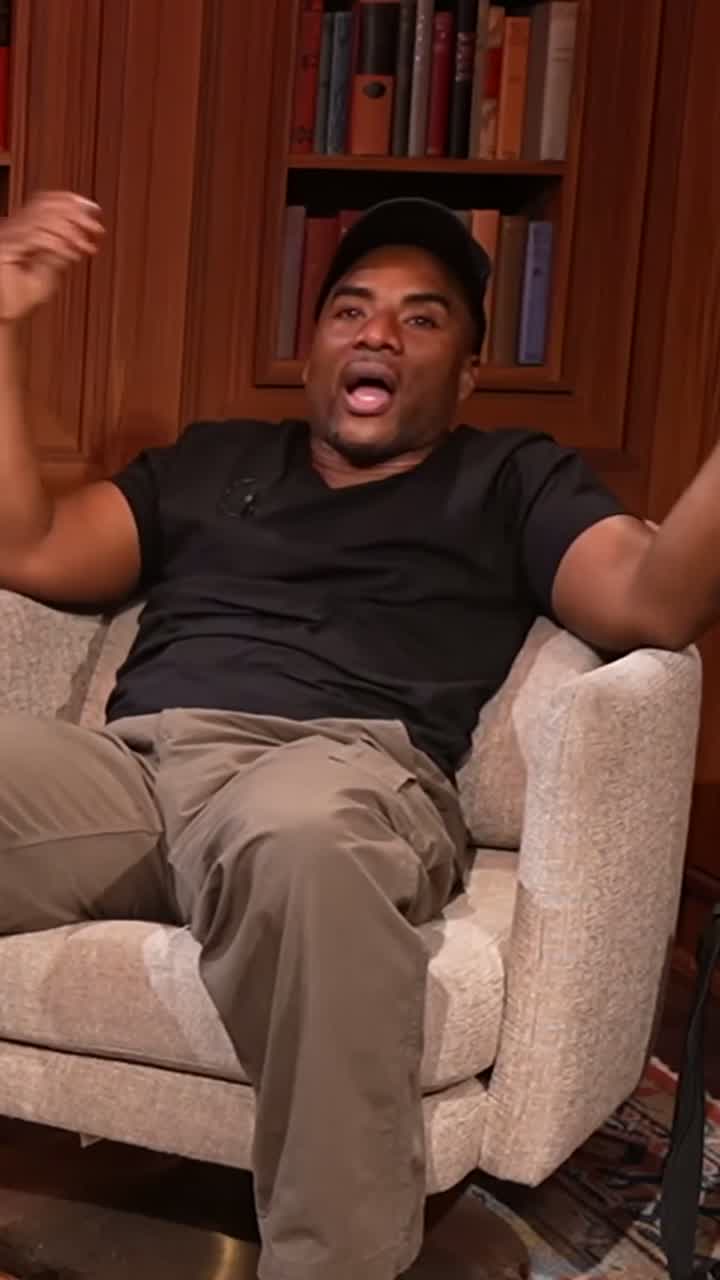

Podcast clip maker comparison table
| Tool | Paste a link | Moment selection | Two hosts talking | Captions | Free tier | Per 60-min episode, entry → best plan |
|---|---|---|---|---|---|---|
| ClipPod | YouTube, Google Drive, Dropbox or any file link, or upload | Picks the moments; open one to see why it was picked | Automatic split, speaker top, captions on the seam | Word-timed, several styles, restyle any clip | A free plan of ≈ 10 clips a month, refilled monthly; clips end with a short ClipPod card | $1.03 → $0.97 (ten videos made) |
| OpusClip | YouTube, Drive, Vimeo, Zoom, Twitch and more, or upload | "ClipAnything", visual, audio and sentiment cues | Automatic Split, Three and Four layouts when the speakers share the frame | Auto captions, 25+ languages | Watermarked, 1080p, 3-day storage | $6.00 → $5.80 |
| Vizard | YouTube link or upload | AI clipping, one-click cut | Keeps the active speaker in frame; no split layout named | Auto captions, 100+ languages | 720p with watermark, 10-min export cap | $2.90 |
| Klap | YouTube link or upload | "Best topics" into clips, about 5 clips per source minute | Split, 3- and 4-screen and picture-in-picture, handled automatically | Auto captions, 52 languages | One free video, no credit card, no watermark | $2.90 → $1.89 (ten clips) |
| Quso.ai | YouTube, Vimeo, Zoom, Drive, Dropbox and more, or upload | Moments scored by "virality" | Two- to four-speaker layouts on paid plans, following whoever talks | Word-level animated, 100+ languages | 75 credits a month at 720p | $17.40 → $4.90 |
| Submagic | Link or upload | "Magic Clips" key moments | Not stated | Strongest caption editor here, 123 languages | Trial only; paid tiers have no watermark | Per video, plus the Magic Clips add-on |
| Descript | Upload | "Create Clips" from the transcript | Automatic Multicam, for multi-track recordings | One-click subtitles | Not stated | Editor pricing |
| Riverside | Records in-app or takes an uploaded file | "Magic Clips" | Smart layouts in the editor follow the main speaker | Animated auto captions | No free plan; 14-day trial | Paid plans |
| Munch | Not stated | Not described; social scheduling first | Not stated | Not detailed | Not stated | Social plans |
Per-episode cost is the monthly price divided by the 60-minute episodes the allowance covers, on the entry plan and on the tool's best-value monthly plan. ClipPod's best value is Creator at $29 for ≈ 300 clips a month, with its episode taken as its share of the month's bar. OpusClip's is Pro at $29 for 300; Quso's is Growth at $49 for 600. Klap bills per clip, so its figures are ten clips on Basic at $29 for 100 and on Pro+ at $189 for 1,000; Submagic bills per output video. Munch is left out: its minutes now come inside social-media-manager plans. Vizard's $2.90 is at its $29 monthly list price; the $14.50 it advertises is the annual rate. Full working in what one episode costs.
The 9 best AI podcast clipping tools in 2026, reviewed
1. ClipPod
Best for two-host and guest podcastsFrom $9/mo for ≈ 90 clips a month · $29 for ≈ 300 clips · prices exclude tax · one monthly bar, you see what each step uses before you confirm · free plan ≈ 10 clips a month
Paste the YouTube, Google Drive or Dropbox link, or drop the file. The clips come back framed for a phone, and when two people share the shot and both faces read the frame splits, the person talking on top and the listener below. Captions sit on the seam between them. Solo moments stay tight on the speaker.
Open any clip to see why it was picked, so you judge the selection by its reasons rather than by watching every one. Here is how that split-screen frame is built.
Pros
- Picks one of six layouts per camera shot; when two are on screen the talker takes the top pane, captions on the seam
- One monthly bar, and you see what each step uses before you confirm; downloads free
- The plan refills each renewal; anything that fails on our side gives back what it used unless the plan refills or ends meanwhile
- Open any clip to see why it was picked
Cons
- Built for people talking: podcasts, interviews, facecam streams and talks. Not for gameplay or slides with no one speaking
- Free clips end with a short ClipPod card (paid plans can switch it off in Settings)
- Audio-only shows are out of scope; it needs the video
- No direct publishing yet; downloads and share links only
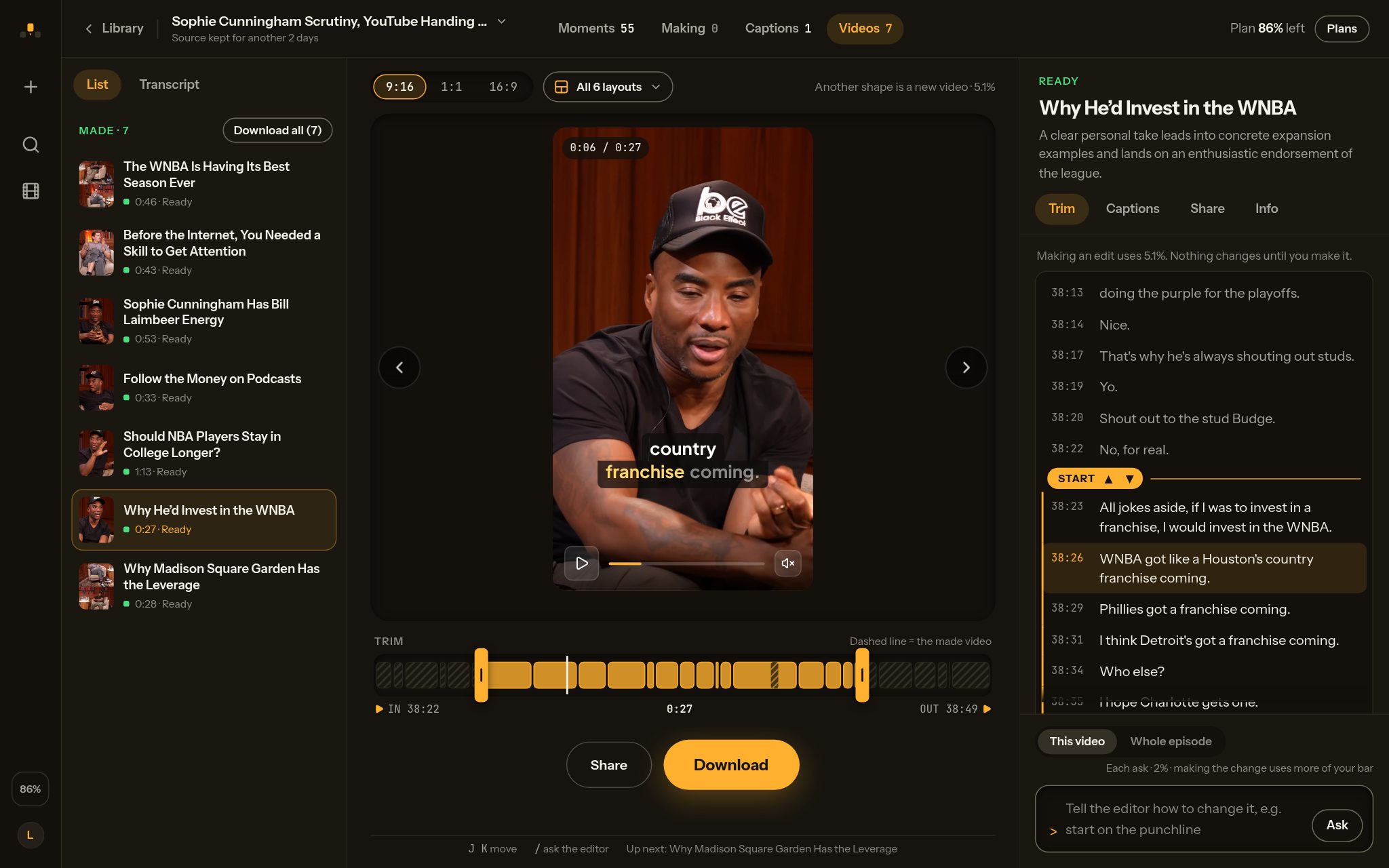
The selection is the part no screenshot proves, so here are three of the 63 reasons the picker wrote for that episode, verbatim:
- "The speakers connect major companies entering podcasts to audience incentives and finish on a sharp observation about people wanting affirmation over truth."
- "A pointed question turns into a lively debate over star power and who actually leads the Fever, with a clear verdict at the end."
- "A clear question leads to a concise explanation of why performers have less negotiating power at the Garden than at other arenas."
Those are the notes an editor would leave. Whether you agree with them is the test, and it takes one episode to run. The first clips from that 92-minute episode were back about 12 minutes after the link was pasted.
We make it, which is why this section describes rather than scores. The honest test is to run your own two-host episode through it on the free plan and look at who is in the frame during the back-and-forth. Pricing and what each step uses are here.
2. OpusClip
Best all-rounder for solo showsStarter $15/mo for 150 credits · Pro $29 for 300 · free tier watermarked · 1 credit = 1 source minute
The longest list of inputs in the category, from YouTube and Drive to Zoom, Twitch and Riverside recordings, and an API for teams. Its moment picker, ClipAnything, works across genres, not only talk, which makes it the safe default if you clip more than podcasts.
Pros
- Widest input and integration list
- Moment selection works on non-talk footage too
- Team workspace, brand templates, API
Cons
- Which speaker takes the top pane is not described
- Monthly credits expire after 60 days
- Reframing is the most argued-about feature in reviews
A one-star Trustpilot review from September 2026 says its "AI Reframe often focuses on the wrong subject", while a five-star one from the same week praises support fixing a reported bug within two days. The $15 plan covers two and a half hour-long episodes, the $29 Pro plan five. OpusClip credits explained, plan by plan.
3. Vizard
Best for volume on a budgetCreator $29/mo for 600 minutes ($14.50 on annual billing) · free tier 720p, watermark, 10-min export cap
ClipPod Creator at $29 for ≈ 300 clips a month works out to $0.97 an hour-long episode with ten videos made, the lowest figure on this list. Vizard's Creator plan is $2.90 an hour-long episode with nothing charged per clip. The $14.50 it advertises is that same plan billed yearly, so read the toggle before you compare. Klap's ten clips cost $1.89 to $2.90 depending on the plan, and Quso Growth is $4.90. Run short on ClipPod in a month and a pack is $9 one-time, ≈ 60 more clips; it never expires and is used only when the plan can't cover a whole action.
Pros
- 600 minutes for $29, nothing charged per clip
- 4K export and no watermark on paid plans
- AI B-roll, direct publish, brand template
Cons
- Keeps the active speaker in frame; no split layout named
- Larger tiers have no published price
- Free tier is 720p, watermarked, capped at ten-minute exports
Worth a trial if you record solo or interview-style and post in volume.
4. Klap
Best when you know your clip countBasic $29/mo for 100 clips ($14 billed yearly) · Pro $79 for 300 · Pro+ $189 for 1,000 · one free video to try, no credit card · bills per clip, not per minute
If you post four clips a week, 100 clips a month covers it with room to spare, and ten clips from an episode come to $2.90 on monthly Basic. Its podcast page says split-screen, 3-screen, 4-screen and picture-in-picture are handled automatically, with speaker tracking choosing the layout, so test it on a two-host episode next to the others.
Pros
- Per-clip pricing suits a fixed posting schedule
- Automatic split, 3- and 4-screen layouts
- Scheduling to TikTok, YouTube, Instagram and LinkedIn built in
Cons
- Every extra clip counts, so a rich episode costs more
- The advertised $14 is the yearly rate; monthly is $29
- The free start is a single video
Per-clip billing changes the maths against every minute-metered plan here, worked through in what one episode costs on each tool.
5. Quso.ai
Best for publishing to many platformsLite $29/mo for 100 credits · Growth $49 for 600 · annual plans double the credits · free tier 75 credits at 720p
Quso takes links from more sources than almost anyone and publishes to six platforms with a brand kit and an AI B-roll library. Its Lite plan is the expensive way to process a podcast, though: $29 for 100 minutes is under two hour-long episodes, or $17.40 an episode. The Growth plan fixes that.
Pros
- Direct publishing to six platforms, brand kit lock
- Word-level animated captions in 100+ languages
- Annual billing doubles the credits
Cons
- Entry plan is $17.40 per hour-long episode
- Speaker layouts are on paid plans only
- Fits a social manager with many short sources better than a weekly hour
6. Submagic
Best captions editorStarter $19/mo for 15 videos (45 credits), 2 minutes per upload · clipping a long episode needs the Magic Clips add-on, +$19/mo for 10 uploads · no watermark on paid tiers
Submagic started as a caption tool and it shows. Reviewers consistently rate its word-level editing and timing above the rest, one August 2026 Trustpilot review calling it "WAY easier to adjust words". Magic Clips, an add-on, finds moments in a long video from a link or upload, and its AI Auto-Zoom handles reframing.
Pros
- Best caption editing and timing in the set
- 123 caption languages
- Hook generator, AI B-roll, scheduling
Cons
- An hour-long episode needs the Magic Clips add-on
- Bills per output video, so a rich episode costs more
- No stated two-speaker handling
7. Descript
Best if you edit the whole episode there anywayEditor subscription; clipping is one feature among many
Descript is an editor first. Create Clips works from the transcript, and its Automatic Multicam switches camera angles, but only on multi-track recordings with one track per camera. If your workflow already lives in Descript, use the built-in clipping before paying for anything else. If it does not, it is a lot of software to adopt for the clips alone.
8. Riverside
Best for recording and clipping in one placePaid plans with a 14-day trial, no free plan; works on recordings made there or an uploaded file
Riverside's Smart layouts switch scenes and layouts to follow the main speaker, in its editor, for recordings made there or a file you upload. It does not take a YouTube link, and its Magic Clips page does not say the clips get those layouts. If you record there, its Magic Clips are the obvious first stop.
9. Munch, plus Async and Podsqueeze
Different jobsMunch Essential $58/mo for 500 minutes · Premium $85 for 1,000 · $38 and $60 billed yearly
Munch, now Munch Studio, has become a social media manager that also cuts video. Podcastle has rebranded to Async and positions itself as a general video maker with a clips feature. Podsqueeze works from the transcript to produce show notes, titles and audiograms, with clips as chapter exports. None of the three describes moment selection or two-speaker framing on its site. Worth knowing about, but not what a podcaster searching for a clip maker is looking for.
Which podcast clip maker should you choose?
Choose ClipPod if two hosts share the frame, and OpusClip if you shoot solo from many sources. Vizard suits you if you want one per-minute price with nothing charged per clip.
- Choose ClipPod if your show has two hosts or a regular guest and you want the split handled without touching an editor, or if you want to see why each clip was picked, and you see what each step uses before you confirm.
- Choose OpusClip if you are one person on camera and you clip from many sources beyond podcasts, or your team needs the API and integrations.
- Choose Vizard if you post in volume, record solo or interview-style, and you want one per-minute price with nothing charged per clip.
- Choose Klap if you post a fixed number of clips a week and want scheduling built in.
- Choose Submagic if you already have your clips cut and captions are the thing you fight with.
- Choose Descript or Riverside if you already record or edit the full episode there. Their clipping is included and good enough to try first.
OpusClip alternatives for podcasts
The best OpusClip alternatives for podcasts are ClipPod for two-speaker framing, Vizard for the simplest all-in price, and Riverside if you record there. Vizard charges nothing per clip and bills the minutes instead. Which one fits depends on which wall you hit: credits ran out on a long episode, the reframe followed the wrong person, or the free tier watermark.
- Credits ran out: Vizard gives 600 minutes for the same $29 as OpusClip Pro's 300. ClipPod Creator's $29 is one monthly bar worth ≈ 300 clips, refilled at each renewal instead of expiring after 60 days. The full plan-by-plan maths is in OpusClip credits explained.
- Wrong person in the frame: When two people are on screen, ClipPod puts the person talking in the top pane and the captions on the seam. OpusClip and Klap also split automatically, Quso does on its paid plans, and Riverside's editor switches layouts with the main speaker. See what the finished split looks like.
- Watermark on free clips: ClipPod's free tier puts a short card after the clip rather than a mark over it. Quso's free tier does not state a watermark but caps exports at 720p.
Vizard vs OpusClip for podcasts
Vizard is cheaper per episode and OpusClip takes more sources. Vizard's Creator plan is $29 a month for 600 minutes, which is $2.90 per hour-long episode; OpusClip Pro is $29 for 300 credits, or $5.80. OpusClip imports from YouTube, Drive, Zoom, Twitch and more; Vizard takes a YouTube link or an upload. On a two-host show they differ: OpusClip splits the frame when both speakers share the shot, while Vizard keeps the active speaker in frame and names no split layout.
| Comparison point | Vizard | OpusClip |
|---|---|---|
| Entry plan, monthly | Creator $29 for 600 minutes ($14.50 annual) | Starter $15 for 150 credits |
| Per 60-min episode | $2.90 | $6.00 entry, $5.80 on Pro |
| Credit expiry | Each month's minutes last two months | Monthly credits expire after 60 days |
| Inputs | YouTube link or upload | YouTube, Drive, Vimeo, Zoom, Twitch, Riverside and more |
| Two hosts talking | Keeps the active speaker in frame; no split layout named | Automatic split when both speakers share the frame |
| Free tier | 60 credits a month, 720p, watermark, 10-min export cap | Watermark, 1080p, 3-day storage |
Pick Vizard on price and OpusClip on inputs and its split. If the two-host back-and-forth is the part of your show that travels, try ClipPod on that episode: the person talking takes the top pane and the captions sit on the seam.
How to test a podcast clip generator on your own episode in an afternoon
Run the same episode through two or three free tiers and compare who ends up in frame and which clips you would have picked yourself.
- Pick one episode you know well, ideally with a stretch where both hosts go back and forth.
- Run it through the free tiers of ClipPod, OpusClip and one more from the list.
- Judge each tool's clips against what a Short actually needs — see turning a podcast into YouTube Shorts.
- Count how many of the top five clips you would have picked yourself. That is the selection score.
- Find the back-and-forth stretch in each tool's clips and look at who is in the frame.
- Watch one clip to the very end on each free tier to see what it stamps or appends.
- Multiply your episode length by your monthly count and check which plan covers it before you subscribe.
No tool replaces taste. Expect to keep three to six of every ten clips whatever you use, and judge a tool on how good those keepers are.
Podcast clip maker FAQ
- What is the best podcast clip maker for two hosts?
- ClipPod, because when two people share the shot and both faces read it splits the frame on its own, the person talking on top and the listener below, with captions on the seam, and it picks one of six layouts for each camera shot. Among the others, OpusClip splits when both speakers share the frame, Klap handles split, 3- and 4-screen layouts automatically, Quso offers two- to four-speaker layouts on paid plans, and Riverside's editor switches layouts with the main speaker. Vizard keeps the active speaker in frame with no split layout named, and Submagic names no two-speaker layout. See how the split is built.
- What is the best free podcast clip maker?
- ClipPod: a free plan of ≈ 10 clips a month, refilled every month with no payment details needed, and a short end card on free clips instead of a mark over the picture. OpusClip and Vizard have free tiers that watermark the picture. Quso gives 75 credits a month at 720p. Klap lets you make one free video, with no watermark.
- What is the best AI podcast clip generator in 2026?
- For talk shows with more than one person on camera, ClipPod. For solo creators clipping from many sources, OpusClip. For the lowest cost per finished episode among the tools compared here, on monthly billing, ClipPod Creator at $0.97 (ten videos made). For the simplest all-in price, Vizard at $2.90 an hour-long episode with nothing charged per clip. Moment selection and captions differ tool by tool, so read the comparison table above before you pick.
- Vizard vs OpusClip: which is better for podcasts?
- Vizard is cheaper, at $2.90 per hour-long episode against $5.80 on OpusClip Pro. OpusClip accepts far more input sources, and on a two-host show it splits the frame when both speakers share the shot, where Vizard keeps the active speaker in frame. The side-by-side table above has the full comparison.
- How much does it cost to clip a podcast episode with AI?
- Between $0.97 and $17.40 for a 60-minute episode, depending on the tool and plan. ClipPod is $1.03 on Starter and $0.97 on Creator (ten videos made). Vizard is $2.90, OpusClip is $6.00 on Starter, and Quso Lite is $17.40. Klap bills per clip, $2.90 for ten on Basic and $1.89 on Pro+, and Submagic per output video. Full arithmetic here.
- Is there a podcast clip maker that works from a YouTube link?
- Yes. ClipPod, OpusClip, Vizard, Klap, Quso and Submagic all take a link, so nothing has to be re-uploaded. OpusClip has the longest list, adding Drive, Vimeo, Zoom and Twitch. Descript works from uploads, and Riverside from its own recordings or an uploaded file.
- Which podcast clip maker is best for a solo host?
- Two-speaker framing stops mattering, so the choice comes down to selection quality and price per episode. OpusClip, Vizard and ClipPod are the three to trial: run one episode through all three free tiers and compare the top five clips. The cost guide has the per-episode arithmetic.
- Can I post the clips directly from the tool?
- Klap, Quso, Submagic, Vizard and Riverside offer direct publishing or scheduling to platforms such as TikTok, YouTube and Instagram. ClipPod has no scheduler. Downloads are free and every clip has a share page, so posting happens wherever you already post.
- How long does it take to get clips from an episode?
- Most tools quote "minutes" without a number. On ClipPod, the 92-minute Brilliant Idiots episode in the screenshot above returned its first clips about 12 minutes after the link was pasted, and 63 clips in total. Longer episodes take longer, since every tool works through the whole runtime.
- What about clips from an audio-only podcast?
- Every tool here wants video. For audio-only shows, Podsqueeze's audiograms or a waveform template in a general editor are the route, and none of the framing questions in this guide apply. A static camera on the episode is enough to put these tools back in play.
Try the two-host test on ClipPod
- Paste a YouTube link; the clips come back framed and captioned, split when two people share the shot
- Open any clip it finds to see why it was picked; downloads are free
- The free plan: ≈ 10 clips a month, no card needed
Plans from $9 a month, excluding tax. See pricing. The plan refills at each renewal; a pack is $9 one-time and never expires. Anything that fails on our side gives back what it used unless the plan refills or ends meanwhile, and a clip that comes out unusable can be reported to get what it used back.
- OpusClip: opus.pro, opus.pro/pricing, help.opus.pro, layout and reframing. Reviews: trustpilot.com/review/opus.pro.
- Vizard: vizard.ai, vizard.ai/pricing (list $29 / annual $14.50, read with the monthly toggle), credit rollover, speaker identification, link import.
- Klap: klap.app, klap.app/pricing (monthly and yearly tabs), podcast clip maker. Reviews: trustpilot.com/review/klap.app.
- Quso.ai: quso.ai, quso.ai/pricing, podcast clip generator.
- Submagic: submagic.co, submagic.co/pricing, care.submagic.co (length limit, Magic Clips add-on). Reviews: trustpilot.com/review/submagic.co.
- Descript: descript.com, Automatic Multicam. Riverside: riverside.com, smart layouts. Munch: munchstudio.com/pricing. Async (formerly Podcastle): async.com. Podsqueeze: podsqueeze.com.
- ClipPod: clippod.app/pricing, clippod.app/terms.